CANopenTerm: A Terminal-Based Power Tool for CAN Network Monitoring and Analysis
If you work with CANopen or other CAN-based networks, you've likely wished for a lean, fast tool to see exactly what's happening on the bus. Enter CANopenTerm — a console-driven application designed for real-time CAN bus work. Unlike bulky GUIs, this tool stays out of your way, letting you sniff raw frames, trace traffic, and poke at nodes right from the terminal. It even supports Lua and Python scripting for advanced tasks and protocol-aware inspection. Below, we answer common questions about this lightweight yet powerful utility.
What is CANopenTerm and what makes it unique?
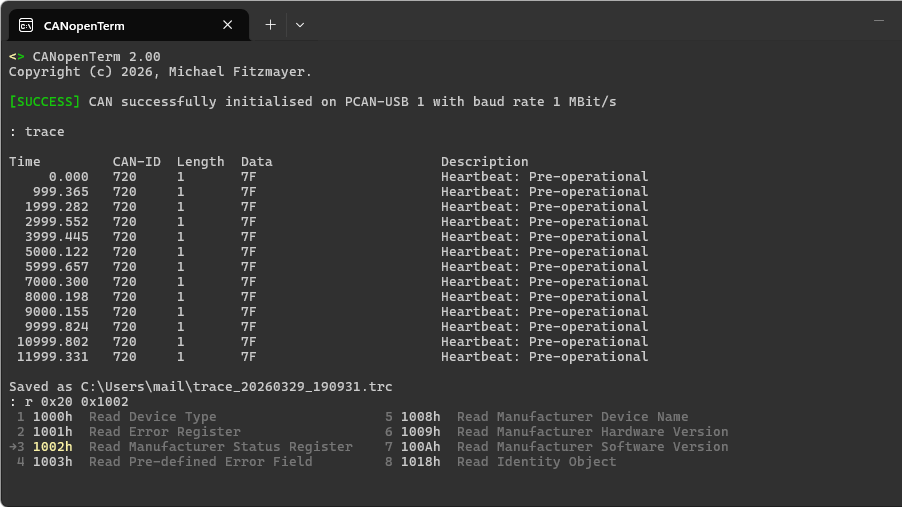
CANopenTerm is a terminal-based software tool developed by Michael Fitzmayer for monitoring and interacting with CAN (Controller Area Network) buses — especially those following the CANopen standard. Its core purpose is to let you see exactly what's happening on the wire in real time. What sets it apart is its text-only, console-driven interface designed for speed and flexibility. Rather than overwhelming users with a heavy graphical interface, CANopenTerm keeps things minimal: you sniff raw frames, trace messages, probe nodes, and even filter traffic — all from the command line. This makes it ideal for developers and engineers who prefer lightweight, scriptable tools that can be integrated into larger automated workflows.
What monitoring features does CANopenTerm offer for CAN traffic?
CANopenTerm provides a suite of real-time capabilities right in the console:
- Raw frame sniffing — capture every frame traveling on the bus, without missing a beat.
- Tracing — log and analyze message sequences to understand communication patterns.
- Node probing — query individual devices to check their status, configuration, or errors.
- Protocol-aware inspection — if you're working specifically with CANopen, the tool understands higher-level protocols, so you can examine PDOs, SDOs, and network management messages directly.
These features run entirely in the terminal, making CANopenTerm a lean alternative to graphical analyzers. You can pipe output, redirect logs, and combine it with other command-line utilities — perfect for embedded engineers who live in the shell.
How can you extend CANopenTerm with scripting?
One of CANopenTerm's biggest advantages is its extensibility through Lua and Python scripting. You can write scripts to automate repetitive tasks, parse custom protocols on top of raw CAN frames, or generate test scenarios. For example:
- Auto-respond to specific CANopen messages during debugging.
- Filter and log only certain COB-IDs to a file for analysis.
- Simulate a node's behavior for integration testing.
Scripts run live alongside the monitoring interface, so you can react to events in real time. This makes the tool adaptable to nearly any CAN project, whether it's CANopen, CAN FD, or a proprietary higher-layer protocol. No need to recompile or install plugins — just drop in a script and go.
Why choose a terminal-based tool over a GUI analyzer?
Many CAN analysis tools come with rich graphical dashboards — but those GUIs can be slow, resource-hungry, and clunky when you just need to see raw data quickly. CANopenTerm flips that around. By staying in the terminal, it offers:
- Speed — instantaneous startup and near-zero latency when capturing frames.
- Lightweight footprint — runs on minimal hardware, even resource-constrained embedded systems.
- Scriptability — easily combine with other command-line tools (
grep,awk,tee) and integrate into CI/CD pipelines. - Focus — no distraction of Windows or pop-ups; pure data on a black screen.
For engineers who are comfortable with the command line, CANopenTerm can be more efficient than clicking through menus. It's built for those who want to get their hands dirty with the nitty gritty of CAN without unnecessary overhead.
What CAN protocols does CANopenTerm support?
While its name hints at CANopen (CiA 301), CANopenTerm is actually a general-purpose CAN tool. It works with any CAN bus — standard CAN 2.0A/B, CAN FD, and custom higher-level protocols. For CANopen, it offers protocol-aware inspection, meaning it can decode and display message types like:
- Network Management (NMT) state changes
- Process Data Objects (PDO) – both Transmit and Receive
- Service Data Objects (SDO) – upload/download commands
- SYNC, EMCY, Heartbeat messages
If your network uses a different protocol, you can still sniff raw frames and decode them manually or via a custom script. The tool doesn't lock you into a single standard — it's a flexible base that adapts to your needs.
How does CANopenTerm compare to other CAN visualization tools?
Other popular CAN tools (like those we've explored previously) often rely on graphical user interfaces or expensive hardware dongles. CANopenTerm takes a different path: it's open-source, terminal-only, and scriptable. While GUI tools may be easier for occasional users or visual debugging, CANopenTerm excels in automation, remote access (SSH), and low-resource environments. It's not necessarily a replacement for all-in-one test suites like PCAN-View or CANalyzer, but it's a powerful complement — especially when you need a lightweight, programmable sniffer that can be tucked into any development script. If you value speed and customizability over shiny buttons, CANopenTerm is a compelling option.
If you have your own CAN projects or tips, we'd love to hear from you on our tipsline!